
Accounts
Every player is an account on your server, and everything needs a login. Accounts are yours to hand out: nothing is shared with any other chess site.
The first administrator
Make it on the server’s own machine:
chesssnake user create yourname --admin
# in Docker:
docker compose exec chesssnake chesssnake user create yourname --admin
It asks for a password (8 to 256 characters). After that, everything else can be done from the Admin page in the browser.
Users and administrators
| User | Group admin | Administrator | |
|---|---|---|---|
| Play, challenge, watch any game | yes | yes | yes |
| Rename themselves, change their password, make api tokens and link codes | yes | yes | yes |
| Start a game between any two players, delete games | no | in their group | yes |
| Move, resign, offer draws, challenge or accept on a player’s behalf | no | in their group | yes |
| Hear every game event of a group over live updates | no | their group | every group |
| Create, rename, disable accounts and reset passwords | no | no | yes |
| Link an account to an outside id, such as Discord | no | no | yes |
| Make someone a group admin | no | no | yes |
The last enabled administrator cannot be demoted or disabled.
Group admins
Games belong to a group: a number that keeps communities apart, such as a
Discord server’s id (the web UI’s games are group 0). A group admin manages
the games of one group and nothing else: a community’s moderators, without the
power to touch accounts or any other group. An administrator grants it:
chesssnake user group-admin bob 184405311681986560          # on the server's machine
chesssnake user group-admin bob 184405311681986560 --remove
or with the Python client (add_group_admin,
remove_group_admin, group_admins) and the REST API. A
group admin can be one for several groups. The web UI’s Admin page is for
administrators only; group admins work through the API or a bot.
The Admin page
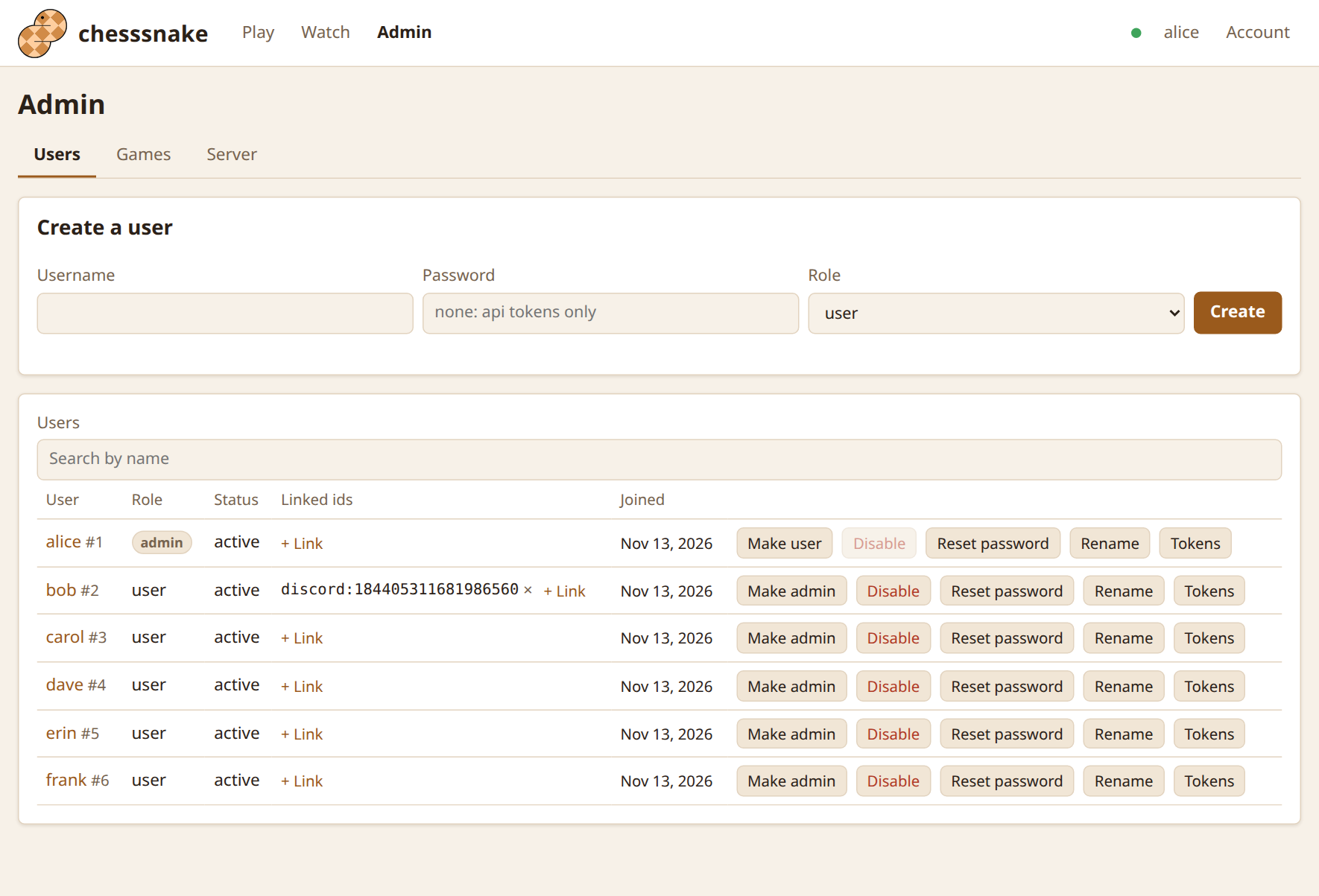
- Users: create an account, search, make someone an admin or a user, disable or enable, reset a password, rename, see and revoke their logins and tokens, and link or unlink an outside id.
- Games: start a game between two players, and watch or delete any game.
- Server: the version, and which features are on.
Disabling an account or resetting its password logs it out everywhere at once.
Letting people register
By default only administrators make accounts. To let anyone sign up from the login page:
[api]
registration = "open"
or CHESSSNAKE__API__REGISTRATION=open. Usernames are 2 to 32 letters,
digits, _, . or -, and unique ignoring case.
Logins and api tokens
- A login is what you get by logging in from a browser or
chesssnake login. It lasts 30 days (api.session_lifetime_days). -
An api token is for a script or a bot. It has a name, and expires when you choose, or never. Make one on the Account page under New api token, or for any user from the server’s machine:
chesssnake user token alice --name my-script
A token is shown once, when it is made. Each can be revoked on its own from the Account page.
| When this happens | Logins | Api tokens |
|---|---|---|
| You log out | that one ends | |
| You change your own password | all others end | kept |
| An administrator resets your password | all end | all end |
| An administrator disables you | all end | all end |
Link codes
A bot that knows your Discord id (or another outside account) plays as you once
that id is linked to your account. To link it yourself, make a link code on
the Account page under Linked accounts (or run chesssnake link-code) and
give it to the bot, for example with its /link command. The code works once,
for ten minutes (api.link_code_minutes); making another cancels it. The bot
never sees your password. You can unlink an account on the same page.
Managing accounts from the command line
chesssnake user works straight on the database, so it needs no login and
works when the server is stopped. Run it where the server’s database setting
is available (inside the container, with Docker).
chesssnake user create bob                 # asks for a password
chesssnake user create helper-bot --no-password   # api tokens only
chesssnake user show bob
chesssnake user set-role bob admin
chesssnake user rename bob robert
chesssnake user set-password bob           # also logs bob out everywhere
chesssnake user disable bob
chesssnake user enable bob
chesssnake user link bob discord 184405311681986560
chesssnake user group-admin bob 184405311681986560   # see Group admins
chesssnake user token bob --name my-script --expires-days 90
Locked out of the only admin account?
chesssnake user set-password yournameon the server’s machine sets a new password.
A user is named by username or id. Passwords are never taken as arguments:
they are asked for, or read with --password-stdin.